
What's new in Tally
May 11 – May 16, 2026
The biggest thing this week is visual. The sidebar swapped its light background for a quieter dark gray with a white logo and orange notification badges — so the chrome steps back and your numbers do the talking. And the four pages where you used to manage your account — Profile, Connections, Import, and Settings — have collapsed into a single Settings page with left-rail navigation. Underneath the refresh, there’s also Linked Payments (transactions that actually move loan balances), Planned Distributions for modeling retirement draws, and a new Budget Pulse report.
A fresh shell — darker sidebar, unified Settings
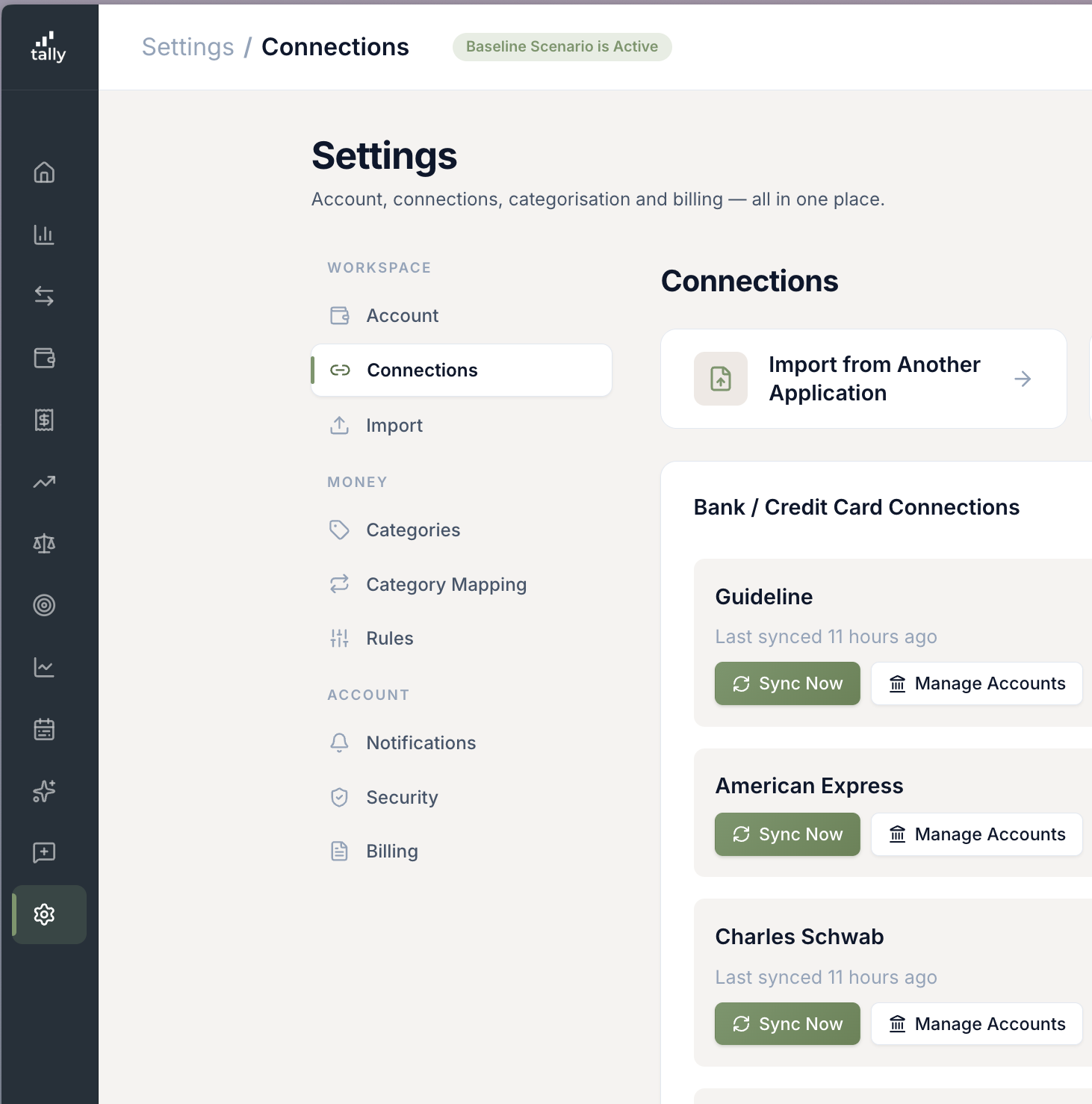
The sidebar is darker and quieter, and the four places where account housekeeping used to live — Profile, Connections, Import, and Settings — have collapsed into one page with a left-rail navigator. "Where do I add another bank?" or "where do I change my password?" now takes one click instead of guessing. Your old bookmarks still work.
- Dark sidebar with white logo and orange notification badges — the chrome recedes so the numbers on the page can be the loudest thing on the screen.
- Connections moved out of the main sidebar. It lives inside Settings now, which is where most people were already going when they wanted to manage banks.
- Left-rail navigation on every settings sub-page — the section you’re on is highlighted, and you can jump anywhere without going back up first.
- All your old bookmarks still work. The legacy /profile, /connections, and /import URLs forward into the correct section automatically.
- The Feedback nav item is renamed "Help / Feedback" and the submit button now reads "Get Assistance / Report an Issue" — it always handled both; the name finally matches.
Linked Payments — your transactions actually pay down your loans
You could already tag a transaction as a payment toward a specific debt, but the tag did nothing — the balance on the loan, lease, or receivable wouldn’t budge. Now it does. Pick a target from the "Track payment toward…" dropdown on any transaction, and the principal portion comes off the balance, the interest portion shows up on its own line, and your loan edit page shows the running balance as a chart. Editing, un-linking, and deleting the transaction all reverse the move cleanly.
- Three kinds of target in one menu. Leases, debts Plaid doesn’t already reconcile (mortgage, auto loan, student loan, personal loan), and loans you’ve issued to someone else — all in the same picker.
- Interest split is automatic. Tally walks back through your prior linked payments on that loan and estimates the interest portion at the moment the payment cleared. You can override it, but you usually won’t need to.
- Loan and receivable pages get a payment ledger — every linked payment with its interest / principal split, plus a running-balance line chart anchored at the original loan amount.
- Lease pages get a month-by-month reconciliation grid — see which months you’ve paid and which ones are still open, at a glance.
- Bulk-link works across all three kinds. Select a stack of historical transactions and apply them to a loan, lease, or receivable in one move.
Planned Distributions and asset-funded expenses
You can now plan a draw from one account into another — a 401(k) into checking, a brokerage into a money market — and Tally will model it with the correct tax treatment. You can also point a specific expense at a specific funding source, so the forecast knows that "kitchen remodel" is coming out of your taxable brokerage, not your paycheck.
- Tax treatment is derived from the source account. Pre-tax retirement → ordinary income. Roth → tax-free. Brokerage → capital gains realized pro-rata. Cash / savings → straight transfer.
- Optional federal and state withholding on each distribution, applied as a prepaid tax credit against your forecast bill.
- Anchor distributions to Life Events. A one-time draw can be tied to "Pay Off Mortgage" or "Retire" and slide with the event if the date moves.
- The expense edit modal has a new funding-source dropdown — pick the asset that pays for this line so the cash flow shows up in the right place.
Budget Pulse — are you on pace this month?
A new report that answers one question: given how much of the month is gone, am I above or below pace on each budget? Pin it to your dashboard alongside your other favorite reports for a one-click read on whether the month is going sideways before the month is over.
- Pace-aware comparison — not just "I spent $X of $Y," but "I’m 18 days into the month and I’ve spent 72% of my Food budget."
- Pin it to the dashboard alongside up to three other reports — Quick Reports already shipped last week, and Budget Pulse slots right in.
- Works with the new Unbudgeted toggle behavior — categories you’ve explicitly set to $0 are now treated as budgeted-at-zero, not missing.
The reports finally have a date picker that doesn’t fight you
Budget vs. Actuals, P&L, and the Expense Report all share one date control now — same as the rest of the app. Presets you actually want, a custom-range picker that lets you pick future dates, and the resolved range printed right next to the button so you can see what "This month" actually expanded to.
- "This month" now means the full calendar month, not month-to-date. (A "This month so far" feels different and shouldn’t be the default.)
- New "This quarter" preset alongside Quarter-to-date.
- Multi-year ranges pro-rate budgets by day-overlap correctly — pick "May 2025 → April 2026" and the budget side actually sums what was budgeted across that span.
- The custom-range picker uses the same calendar component as the rest of the app — adjacent-month days no longer look grayed-out and broken.
Quality-of-life improvements
Smaller upgrades you'll probably notice.
Paycheck deductions now drive your forecast taxes
Every deduction line on your paystub — 401(k), HSA, health insurance, FSA, commuter, union dues — finally counts where it should. Pre-tax retirement contributions reduce federal and state taxable income (but not FICA); HSA / FSA / Section-125 health and commuter reduce all three; life, disability, and garnishments stay post-tax. The result: a much more accurate take-home and a much more accurate forecast tax bill. You can also add or edit deductions manually on the income page now, not just from an uploaded paystub.
Employer match was 100× too small — now it’s right
A long-standing bug was dividing your employer 401(k) match by 100 twice, so a 6% match was showing up as 0.06% in the forecast. If your projected retirement balances looked surprisingly modest, this is a big part of why. Existing matches will start contributing the correct amount on your next forecast run.
Add deductions inline, for any income type
Deductions used to only be available for W-2 / bonus income, and only after you’d saved the income record. Now the deductions panel lives inside the income form itself — for every income type, including self-employment and rental — and you can stage rows before the income is even saved.
New date picker across the reports
Budget vs. Actuals, P&L, and the Expense Report all use the same date control as the rest of the app now: presets like "This month," "YTD," and "This quarter," a clean range picker, and the resolved range printed right next to the button so you can see exactly what you’re looking at. Future dates are allowed in custom ranges. The native browser date picker (which made adjacent-month days look broken) is gone.
Imports: linked-account picker grouped and named the way you named them
When you re-import from Monarch, a CSV, or another competitor and need to point a column at an existing account, the picker now groups by Cash / Credit Cards / Investments / Loans / Other and shows the friendly name you gave the account — not the bank-given name. Two identically-labeled "Platinum Card" rows are finally distinguishable.
Net worth tiles show the projected next-year delta again
The "projected next year" badges on the Total / Liquid Net Worth dashboard tiles were quietly comparing to a recent-month snapshot, not a forecast. They now match the upward trend in the Net Worth Projection chart below.
Loan, mortgage, and auto payments count toward Total Expenses
Your "Total Expenses" and "Total Recurring Expenses" cards now include payments on mortgages, auto loans, and similar debt — matching what the Debt Payments section already showed. Credit cards still stay excluded so spending doesn’t get double-counted with the category totals.
Plaid balance dates always advance, even when the number didn’t move
A stable account would show "last updated 5/9" even when we’d been checking it daily, because the date only ticked when the dollar figure changed. Now the date always reflects the most recent successful sync, so you can trust that "as of today" actually means today.
Unbudgeted toggle hides $0-budget categories too
The "Show unbudgeted only" filter on the reports now hides categories you set to exactly $0 — they’re budgeted, just at zero — instead of treating them like missing budgets. The list now reads like "what didn’t I plan for."
Fixes
Small things that were wrong. Now they're right.
- Linked loans you’ve issued: saving the loan from the edit page no longer wipes the current balance back to the amortization schedule and erases progress made via linked payments.
- Forecast: planned distributions and asset-funded expenses no longer create "phantom money" — the engine was double-crediting the destination account because the synthetic flow leaked into gross income. The household balance sheet now reconciles end-to-end.
- Forecast: brokerage distributions are taxed on the realized capital gain, not the full gross withdrawal — so a $50k draw with a $10k embedded gain stops generating a $50k tax bill.
- Forecast: RMD income is now recorded against the amount that actually came out of the source account, so a mid-year drained account no longer keeps "earning" RMD income on paper.
- Forecast: the "Overrides this year" panel under the chart no longer leaks future event-anchored overrides into the current year’s P&L and Balance Sheet.
- Balance History: the date column was reading one day earlier than what you entered when your timezone was west of UTC. Now it shows the date you actually picked.
- Deductions: re-uploading a paystub after fixing an error no longer 500s and no longer creates ghost categories in your category list.
- Auth: password-reset and email-verify links no longer kick you to the login page before the page can read the token out of the URL — so the reset / verify flow actually completes on first click.
- Mobile: the Tally Assistant chat bubble now hides itself while a modal is open, so it stops covering the Save / Cancel buttons on full-screen sheets.
- Budget Pulse legend: the bar showing your daily plan was rendered with a tiny dotted line that looked like a glitch. Now it’s a clean dashed line.
Take the refresh for a spin
Sign in and the new sidebar will greet you on the way in. Click Settings in the sidebar to see the new shell — Profile, Connections, Import, and Subscription & Billing all live there now, with a left rail to jump between them.