
What's new in Tally
July 4 – July 16, 2026
Tally has always been good at the next thirty years. This release is about the next thirty days. Cash Planning shows your checking balance projected forward day by day — every bill, every paycheck, every card payment — so you can see a tight week coming while there's still time to do something about it. Alongside it: email a receipt to Tally and it finds the matching charge and splits it by line item, the Accounts page now lists everything you own and owe whether it's connected or not, and your forecast's tax math finally reads like a story you can follow.
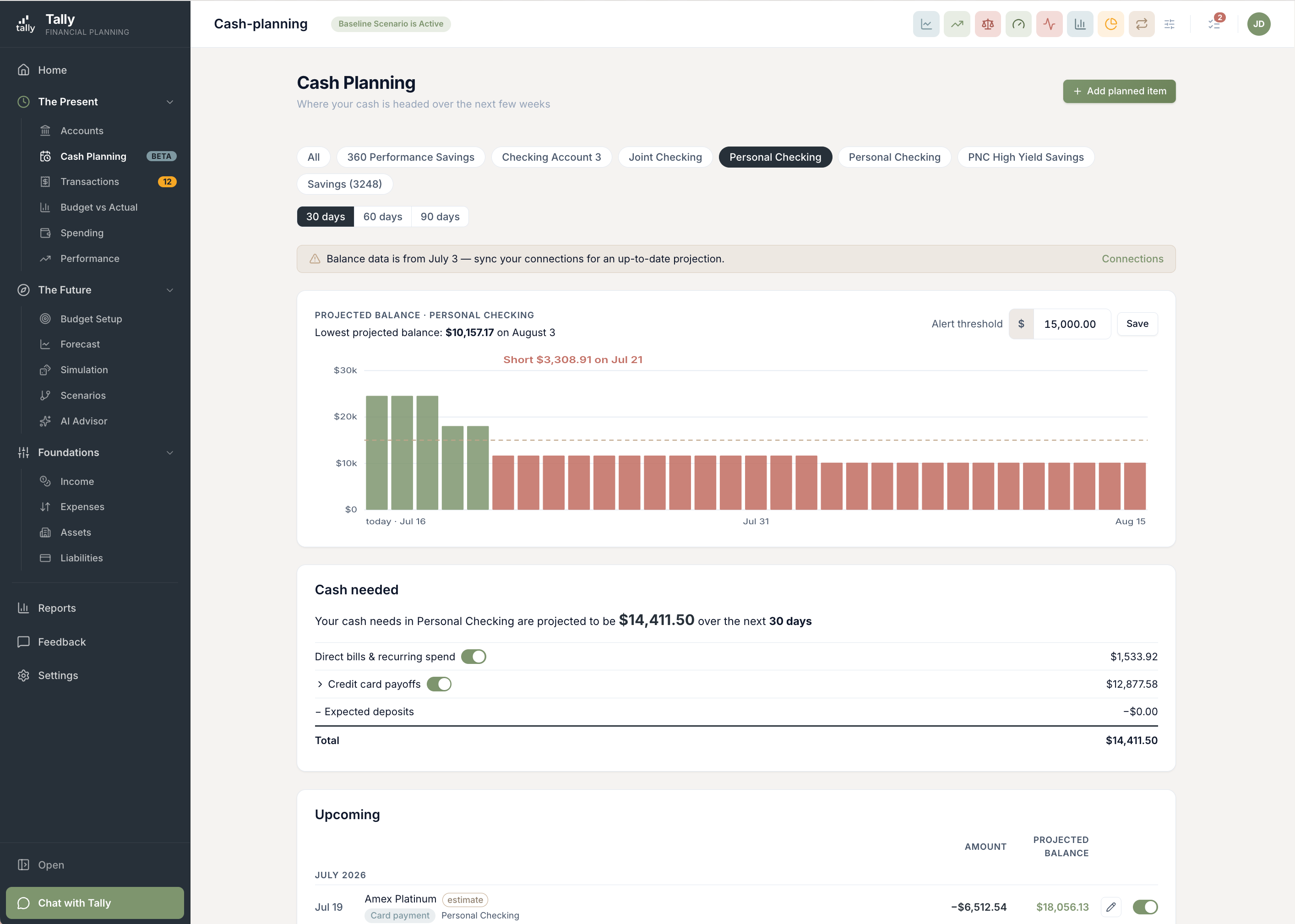
Cash Planning: the next 90 days, day by day
A long-range forecast can say you're in great shape and still leave you wondering whether the mortgage clears before Friday's paycheck. Cash Planning answers that question. Pick a cash account and Tally charts its projected balance forward 30, 60, or 90 days — starting from today's real balance and layering on your bills, your paychecks, your card payments, and anything you tell it is coming. The lowest day of the stretch is highlighted, and any day that dips below your comfort level is impossible to miss.
- It already knows most of your month. Tally reads your history for the bills and paychecks that repeat, and reads your income setup for what's declared — pay frequency, payday, take-home. Weekend paydays roll back to Friday, the way they actually land.
- An upcoming list with a running balance. Every projected transaction shows what your balance will be right after it — green while you're healthy, red once you're not. The one transaction that tips you over the line is called out by name.
- "Here's what you need." A single card totals the cash your window calls for, broken into direct bills, card payoffs, and expected deposits — each with a switch to include or exclude the whole class while you think it through.
- Anything Tally got wrong, you can correct. Exclude an event, override an amount or a date, add a one-off or a recurring item of your own, pause it, bring it back. Your corrections stick.
- A heads-up before it happens. Set a comfort threshold per account and Tally emails you once when the projection dips below it — one message per household listing every account that needs attention, and what's driving it.
- Ask the assistant. "Am I short before the 15th?" works in chat, drawing on the same projection the page shows — never a second opinion.
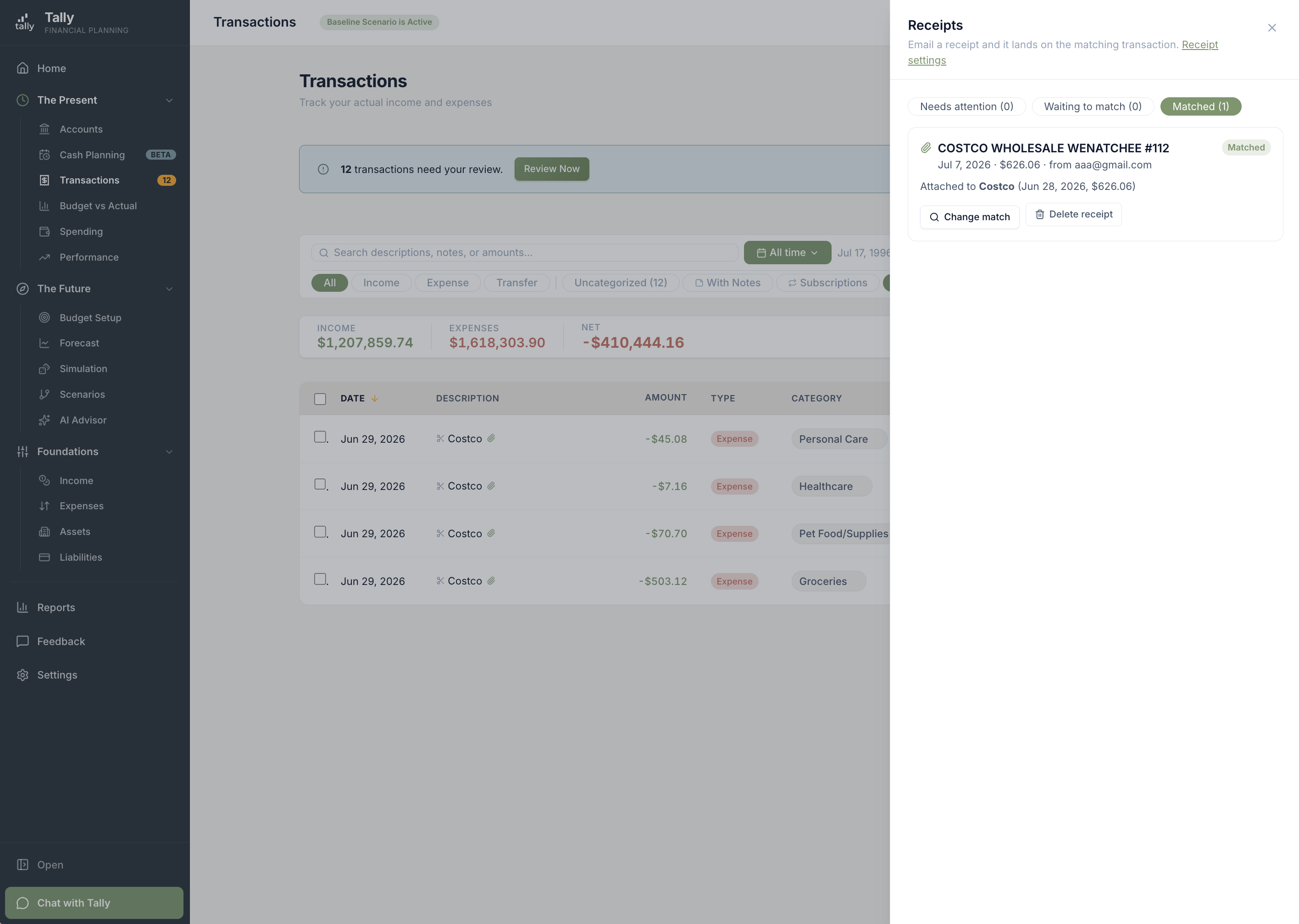
Forward a receipt. It files itself.
Everyone has the same problem with Amazon. One order, one charge — and a line on your statement that says nothing but AMZN Mktp US. It was dog food, a phone case, and a birthday present, and your spending report calls the whole thing "Shopping." Receipts close that gap. Tally gives your household a private email address — forward the order confirmation and Tally reads it, finds the matching charge, attaches the document, and splits the purchase across the right categories, down to the penny. It works the same for the warehouse club run, the hardware store, and the bill you'd rather not open.
- One charge becomes a real breakdown. Line items are read off the receipt and sorted into your categories, with sales tax and shipping spread proportionally across them. Your spending report stops calling a hardware run "Home Improvement" when half of it was the garden.
- Disagree? Tag the lines yourself. "Edit split" lists every item on the receipt with a category picker beside it. Tag them your way and Tally rolls them up and re-splits — and remembers your choices, not its original guesses.
- It won't guess when it isn't sure. Auto-matching requires the amount and the merchant to line up. Anything less becomes a ranked suggestion in your inbox for you to confirm — and you can attach or reassign any receipt by hand.
- Money-in notices work too. Forward a "So-and-so paid you $200" note from Venmo or PayPal and Tally attaches it to the matching deposit as documentation — and if it looks like someone repaying a loan you've tracked, it offers to reconcile.
- An inbox on your Transactions page. See what's waiting, match it, or dismiss what you don't want kept. Transactions with a receipt carry a paperclip, and a "Has receipt" filter finds them.
- Your address, your rules. The private address is yours alone and you can regenerate it any time. Sharing the common address instead means naming which senders are allowed to reach your household.
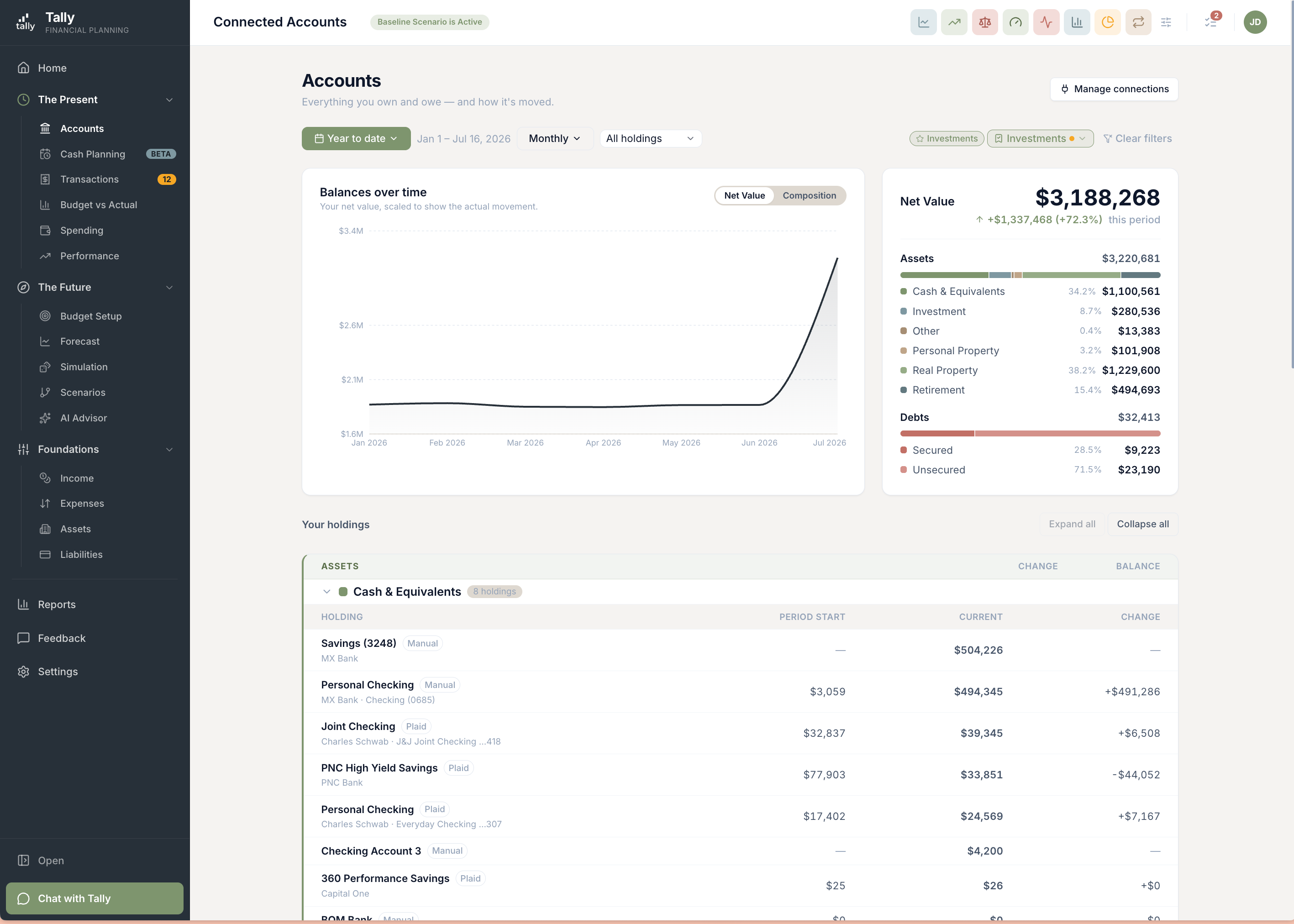
Everything you own and owe, on one page
The Accounts page used to list what Tally was connected to. That's a technical distinction, and it's not how you think about your money — your house and your car aren't less real for not having a login. Now the page lists everything: every asset, every debt, connected or hand-tracked, one row each. The Net Value at the bottom is your net worth, exactly as the rest of Tally computes it.
- Property, vehicles, crypto, loans — all present. Manually tracked things sit right alongside connected accounts instead of living on a separate page.
- Know where every number came from. Each row carries a badge for its source, so you can tell a live bank feed from a valuation from a figure you entered yourself.
- Open a row, see its history. The detail drawer charts that thing's balance over time and matches the row exactly — with a drill-in to its transactions, or a link to its edit page if it isn't connected.
- Filters and saved views carry over. The views you already saved keep working.
Your forecast's taxes, explained from the top
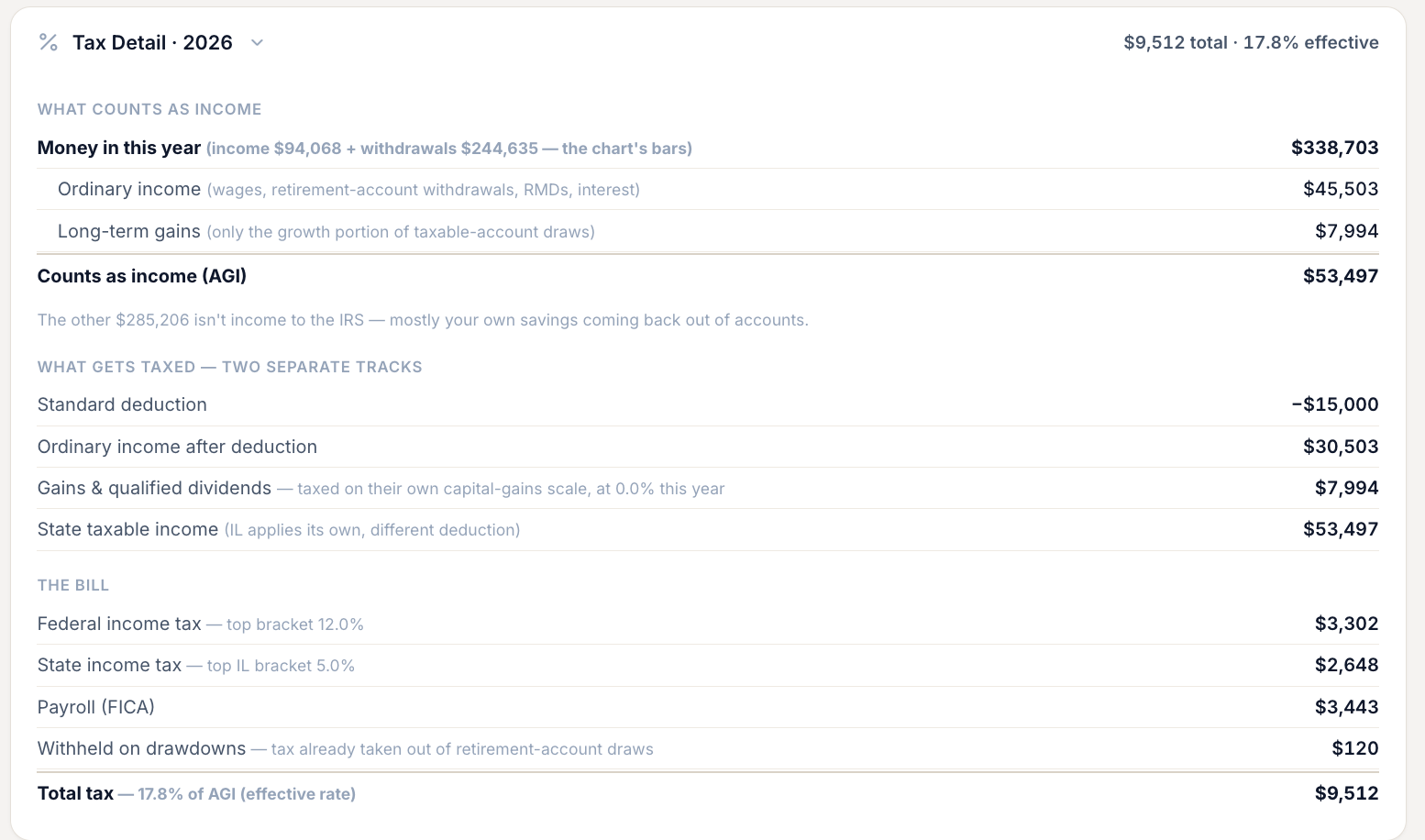
Every forecast year computes a tax bill, and until now the page showed you the middle of that calculation and left you to bridge the rest. The rebuilt Tax Detail card reads top to bottom, like the explanation a good accountant would give: here's the money that came in, here's the part of it that counts as income and why, here's what's taxed on which scale, here's the bill.
- Why isn't all my money taxed? The card answers it. Savings coming back to you and untaxed Social Security are named as the reason the income figure is lower than the cash — instead of a gap you have to take on faith.
- Two tracks, made explicit. Your deduction offsets ordinary income; capital gains and qualified dividends ride their own scale, with the rate shown inline. That's why the numbers never subtracted the way you expected — now it says so.
- The bill ties out. The rows in the card are the same rows in the Money Flow chart, and they sum to the same total, each with its bracket noted. It opens collapsed with the total and your effective rate on the header.
Cost basis, without the homework
What you paid for something decides what you'll owe when you sell it — and keeping that figure current across a house, a brokerage, and a decade of purchases is nobody's idea of a good weekend. Tally now carries more of that weight for you.
- Record what you paid for the house. Homes, rentals, land, business equity, and collectibles have a Purchase Price field now, so a planned sale is measured against your real purchase. Leave it blank and the forecast tells you which figure it used and where to enter yours — it never hides the assumption.
- Brokerage basis comes straight from your broker. For connected taxable investment accounts, Tally assembles your starting basis from your broker's own per-position figures — so it keeps pace with what you actually own, with nothing for you to maintain by hand.
Plans that borrow, not just plans that save
Not every expense comes out of cash flow. A renovation goes on the home equity line; a build runs on a construction loan that turns into a mortgage when the work is done. Tally can model both now.
- Fund an expense from a line of credit. Point an expense at a HELOC, securities-backed line, or card and the forecast draws against it instead of your cash — capped at your available room, with the debt and its interest showing up where they belong. The Money Flow list labels the spend as funded from that line, so it never reads as cash you didn't have.
- Construction loans that convert. Model the interest-only draw period, then the date it becomes a traditional amortizing mortgage — term and rate and all. Anchor the conversion to a life event and it moves when your plan moves.
- The cost of borrowing, on the calendar. Draw against a line partway through a year and the forecast carries the interest from the month the money lands, tracking what you'd drawn as of each payment — so the schedule reads like the lender's will.
Rules you can actually manage
Categorization rules are wonderful right up until you have forty of them. This release is for everyone who crossed that line: a page built for a real collection instead of a short list.
- Group them, drag them, order them. Sort rules into named groups and drag them within or between groups. What you see is the order they run in — always.
- Find the one you're thinking of. Search by name, and filter by On, Off, or Stale — stale being the rules that haven't matched anything in months and are probably left over from a card you closed.
- Duplicate instead of retyping. One click opens a copy of a rule, prefilled, ready to tweak. Editing happens in a side drawer so you keep your place in the list.
- Or just ask. The assistant can now list your rules, preview what one would catch before you commit, create and toggle them, manage groups, and apply a new rule back over your history.
Editing an account, income, or debt is a calmer place
The pages where you edit an asset, a liability, an income, or an expense had grown into a stack of tables. They're rebuilt around what you came to do: a clear header with the thing's headline value, the form front and center, and everything else tucked into summary rows that open when you want them.
- Schedules and activity, on demand. Balance history, contributions, transfers, payoffs, escrow — each becomes a one-line summary that opens the full list in a side drawer.
- Save is always reachable. A save bar pins to the bottom of the screen, so a long form never means scrolling to find the button.
- Context where you need it. Mortgages show their payment breakdown, incomes show what a single paycheck looks like, and connected accounts say plainly which figures come from the feed.
Better what-ifs, better date ranges
Scenarios got more expressive, and the date control that sits on top of eleven different pages got a lot more honest about what a "month" means.
- Transfers inside a what-if. Model "sell this, fund that" entirely within a scenario — including accounts that only exist in the scenario — without touching your real plan.
- "Estimate the sale price from my forecast." Don't know what the house will be worth in 2034? Let the sale run at whatever your forecast projects for that date, and see the preview before you commit.
- "Last 12 months" means twelve whole months. Rolling ranges now run through the last completed month instead of slicing the one you're in — with Last 3, 6, and 9 months joining the menu, and prior-period comparisons lining up properly.
- A custom range that doesn't guess. The picker highlights whether you're setting the start or the end, and a calendar click fills that one. No more wondering which end you just moved.
- The assistant speaks scenarios. It can build and change scenario transfers and shift a life event's date within a single what-if, always showing you the change for approval first.
More improvements
Upgrades that didn't need their own headline.
Your accounts are called what you call them
Every place Tally names an account — filters, reports, pickers, emails, the assistant — now shows the name you gave it, not the one your bank reports. If you have three accounts the bank all calls "Ultimate Rewards," you can finally tell them apart.
Subscriptions are flagged right in your transactions
Charges that belong to a recurring subscription now carry a repeat icon, and a Subscriptions filter narrows the page — and its totals — to just those charges. It uses the same detection as the Subscriptions report, so the two always agree.
Budget vs. Actuals has a trend view
Flip the summary from bars to a trend line and watch budget and actual track each other across the year. A new Both / Income / Expenses filter narrows the whole report, and your choices follow you between devices.
Today's dollars or future dollars, your call
One toggle switches every figure on the Forecast and Simulation pages between future dollars and inflation-adjusted dollars — and it is a single setting, so the two pages can never disagree about which lens you are looking through.
Transfers show up on both accounts
A planned move between accounts used to appear only on the account where you created it. Now both sides show it, with a From → To strip and editing from either end — so you never model the same transfer twice.
Fixes
Small things that were wrong. Now they're right.
- Dropdown menus stay inside the window on narrow screens instead of getting clipped.
- The Money Flow column header stays pinned as you scroll, so you always know which year's numbers you're reading.
- The whole alerts pill on the Forecast page is clickable, not just the arrow.
- The subscription icon now shows on transaction cards on mobile, matching the desktop list.
- The Year-End Outlook chart zooms to your actual numbers instead of stretching down to $0.
Go look at your next 30 days
Sign in, open Cash Planning, and pick your checking account. Set the balance you like to stay above, and see how the month ahead actually lands. Then forward your next receipt to your private Tally address and watch it find its charge.